


Bitsgap: Crypto Trading Bots
3.417.00 Reviews
App Specs
- Version
- 2.8.0
- Updated On
- License
- Free
- Downloads
- 50,000+
- Developer
- Bitsgap
- Categories
- Finance
- Platform
- Android
Screenshots
 Analysis by AppCompare
I approach crypto automation as a way to make a chosen routine more consistent, not as a shortcut to reliable profits. That distinction matters with Bitsgap: it is a finance app from Bitsgap for coordinating trading activity across exchanges, and its automated tools are most useful when you already understand what you want them to do. If you are still deciding whether crypto suits you, or you want an app to make investment decisions on your behalf, I would start elsewhere.
What the app is like today
The practical appeal is having a central place to work with crypto trading tools instead of repeatedly switching between exchange apps. Bitsgap is free to install, is rated for Everyone, and has more than 50,000 installs. Its average rating is 3.4 from around 180 ratings, a mixed enough score that I would treat it as a reason to try carefully rather than assume it will fit every workflow. The app offers in-app purchases, so “free” does not necessarily mean every capability or plan is included at no cost.
For me, the central question is not whether automation sounds convenient, but whether I can explain the rules I am asking a bot to follow. A bot can carry out configured actions; it cannot make a risky strategy sensible simply by running it automatically. Before connecting an exchange account, I would decide what I want to automate, what amount I am prepared to expose to market risk, and when I will review or stop the activity.
Getting to Know Bitsgap
First things first, let's dive into what Bitsgap actually is. At its core, it’s a platform that integrates with numerous crypto exchanges, providing a unified interface for managing your assets. The app is known for its crypto trading bots, which aim to automate the trading process, allowing you to focus on strategy rather than execution.
The Setup Experience
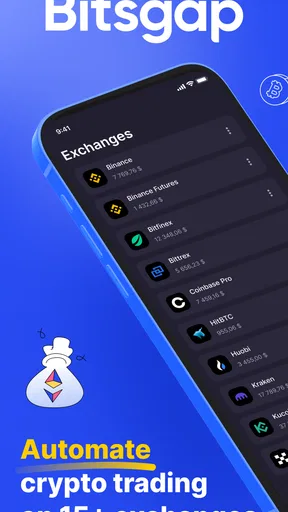
Installing Bitsgap was straightforward. After setting up an account, I was greeted with a clean, intuitive dashboard. The app supports a plethora of exchanges like Binance, Kraken, and Coinbase Pro, which means you don’t have to hop from one platform to another. Connecting your exchanges is as simple as entering your API keys, and voila, your assets are ready to be managed all in one place.
That connection step is also where I would slow down. An API key links an external service to an exchange account, so I would create only the permissions needed for the intended task, avoid enabling fund withdrawals where the exchange lets me control that, and keep the key private. I would also begin with a small, clearly bounded experiment rather than connecting every account at once. A central dashboard is convenient, but it concentrates your workflow: a mistaken setting or misunderstood signal can affect more than one exchange if you have configured several.
Exploring the Features
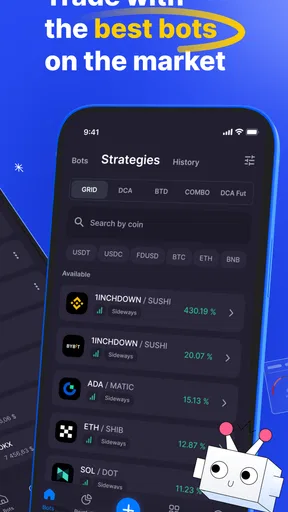
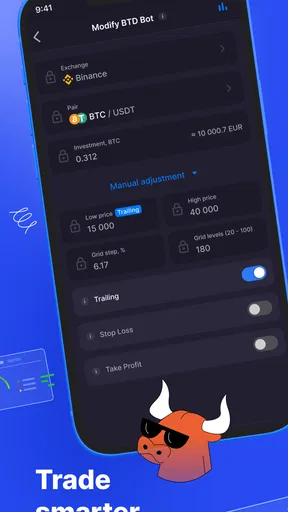
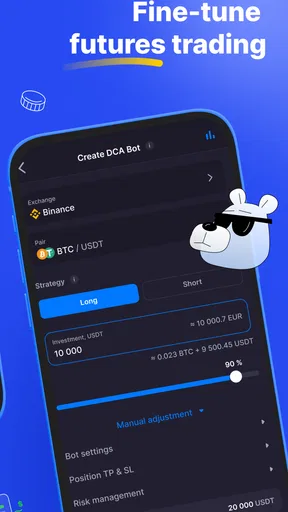
Bitsgap’s biggest selling point is its trading bots. These bots can be configured to execute trades automatically based on parameters you set. I found the Grid Trading Bot particularly interesting. It works by buying low and selling high within a defined price range, aiming to profit from market fluctuations. Setting it up was surprisingly easy, thanks to the app’s user-friendly interface.
Worth Reading Before You Choose

EA SPORTS FC Mobile 26 Is a Bigger Football Game, but It Takes Time

Flipboard Shows What News Apps Must Do Beyond the Feed

Switching to Android Auto Means Rethinking Your Driving Routine

Google Calendar Makes a Crowded Week Easier to Manage

Ludo King Makes the Most of the Minutes Between Plans

Baby Panda World Brings Quick Play to Modern Phones, but Its Game Library Feels Busy
The important trade-off with a grid is that it follows a range-based idea, not a promise that the market will stay inside the range. If the price moves persistently beyond the boundaries, the strategy may no longer behave the way you hoped, and repeated orders can create costs or exposure that are easy to overlook when focusing only on individual trades. I would choose a range only after thinking through what I will do if the price leaves it, and I would check the exchange’s fees as part of that decision.
A useful first exercise is to write down the bot’s purpose in plain language before setting it up: what market condition is it meant to handle, what would count as a reason to pause it, and how often will I check it? That small routine makes it easier to distinguish a deliberate strategy from a bot left running because it is out of sight. Automation can reduce repetitive execution, but it does not remove the need to monitor market conditions or understand the consequences of the settings.
Another noteworthy feature is the demo mode. Before diving into the deep end, you can test your strategies without risking real funds. This is a fantastic way to get comfortable with the platform and refine your trading tactics before committing any actual crypto.
I would use demo mode to test whether I understand the workflow, not to conclude that a strategy will perform the same way with real funds. A simulated run can help reveal confusing settings and show how a bot responds to changing prices, while live markets bring real balances, exchange fees, and emotional pressure into the decision. Moving from practice to real trading should be a separate choice, made with a smaller risk limit and a clear plan for stopping.
Interface and Usability
One of the things I appreciated about Bitsgap was its slick design. Everything is neatly organized, making it easy to find the tools and features you need. The app's responsive layout works well on both mobile and desktop, ensuring a seamless experience whether you’re at home or on the go.
That mobile convenience is best treated as a way to check and manage a routine, not as a reason to make hurried changes while distracted. A realistic use case would be reviewing a bot during a lunch break, noticing that the market has moved outside the range you planned for, and deciding whether to pause and reassess rather than expanding the range on impulse. I would keep a short note of the original settings and the reason for any change; otherwise, it is easy to lose track of whether a result came from the original plan or a series of reactive edits.
The learning curve is gentle, even for those who might be new to the world of crypto trading. There are plenty of tutorials and resources available within the app to help you get started, and the support team is just a click away if you need them.
Even with guidance, I would not treat an easy setup as evidence that a strategy is low risk. The person using the app still needs to understand the exchange, the assets being traded, and the effect of their own settings. New traders who are learning basic market and order concepts may find a standard exchange interface easier to understand at first, because it keeps the focus on placing and reviewing trades rather than coordinating an automated system.
Choosing it over a simpler workflow
Compared with using each exchange’s own app, a multi-exchange tool can save the repeated effort of checking several accounts in separate places. That is most valuable if you genuinely manage activity across multiple exchanges and want automation to follow rules you have already considered. If you use only one exchange, trade infrequently, or prefer to approve each order yourself, the exchange’s native tools may be simpler and involve fewer account connections to maintain.
Compared with manually placing trades, a bot can apply a preset routine without requiring you to watch every price move. The cost of that convenience is less flexibility in the moment: a bot follows its configuration, while a person can pause to reconsider new information. I would not choose automation just because I am busy. I would choose it only when the repeated task is clear enough to describe and when I am comfortable with the bot continuing to act within the boundaries I set.
For an everyday schedule, imagine checking markets at a few predictable times rather than keeping an exchange open all day. You could use demo mode to understand a proposed grid, decide in advance how you will respond if conditions change, and then review activity at a set time. That makes the app a tool for carrying out a defined process, not a substitute for checking whether the process still makes sense.
Security and Support
In the realm of crypto, security is paramount. Bitsgap employs industry-standard encryption to protect your data. Since you’re connecting your exchange accounts via API, it’s reassuring to know that your funds are not directly held by Bitsgap, reducing the risk of theft from the platform itself.
That separation should not be mistaken for risk-free access. The exchange account and API permissions still matter, and account security depends on careful key handling as well as the app’s protections. I would use a unique, strong account password, enable two-factor authentication where available, and periodically review connected keys at the exchange. If I stopped using a connection, I would remove its access rather than leave an old key active indefinitely.
Additionally, the app offers two-factor authentication, adding an extra layer of security to your account. Support is responsive and knowledgeable, which is a big plus when you’re dealing with potentially complex issues in trading.
Version, cost, and what to keep an eye on
The current Android version is 2.8.0, and the app was released on March 19, 2024. Those details are useful context, but a version number by itself does not tell me which features changed or whether a particular issue has been addressed. I would check the in-app release notes when updating and test any important workflow again before relying on it for live activity. Updates can be a sign of ongoing product development, but I would separate that general expectation from confirmed changes: I would not assume a new version includes a specific bot, exchange, or security improvement unless the app clearly describes it.
In-app purchases range from $30.99 to $699.99 per item, so I would look closely at what a paid option unlocks before committing. The right question is whether it solves a real limitation in my own routine, not whether a higher-priced tier sounds more advanced. If the free experience already covers a small, careful trial, I would use that first; if a feature is gated, I would compare its cost with the time or flexibility it would actually save.
For existing users, the most sensible approach to changes is practical rather than speculative: review the version notes, confirm that connected exchanges and bot settings still match your intentions, and avoid assuming an update preserves every detail of a workflow without checking. If a bot is running, I would make that review at a time when I can pay attention, not during a rushed commute or between unrelated tasks.
The details I would continue watching are whether the app’s current exchange connections suit my own accounts, how clearly it explains changes that affect existing setups, and whether its paid options remain worthwhile for the way I trade. Those are questions to assess through the actual app and my own needs, rather than promises I would infer from a release number. For a finance tool connected to trading accounts, clear explanations and dependable control matter as much as an appealing interface.
Who is likely to benefit—and who should pass
I see Bitsgap as a better fit for someone who already uses crypto exchanges, has a repeatable trading idea, and wants a single workflow for coordinating it. It may also suit a cautious learner who is willing to spend time in demo mode before deciding whether automation belongs in their routine. The combination of a dashboard and configurable bots has a specific advantage when the alternative is repeatedly checking multiple exchange apps and manually carrying out the same kind of action.
I would skip it if I wanted a hands-off way to make money, could not afford the possibility of losing the funds involved, or did not want to manage API connections and trading settings. It is also not my first choice for someone who makes only occasional purchases and wants a simple place to buy and hold crypto. A standard exchange app is likely to feel more direct in that situation, while a portfolio tracker may be more appropriate if the main need is simply seeing balances rather than automating trades.
One question people often have is whether they need to pay to try it. The app is free to install, but optional in-app purchases are available, so I would check the specific feature and price in the app before deciding. Another is whether automation removes the need to watch the market: it does not. I would still set review times and know how to pause or reassess a strategy. And if I am unsure whether a bot’s rules make sense, I would remain in demo mode or avoid running it with funds until I can explain those rules clearly.
Final Thoughts
After spending some quality time with Bitsgap, I can see why it’s gaining traction among crypto traders. Its automated trading features and comprehensive exchange integration make it a compelling choice for those looking to streamline their trading activities. Whether you’re a seasoned trader or a curious newbie, Bitsgap offers tools and resources to help you navigate the volatile waters of cryptocurrency with more confidence.
If you’re ready to take your trading to the next level, Bitsgap might just be the ally you’ve been looking for. With its blend of automation, security, and ease of use, it’s definitely worth trying out. Happy trading!
Pros
- User-friendly interface for beginners.
- Automated trading saves time.
- Supports multiple exchanges.
- Advanced trading tools available.
- Real-time market data access.
Cons
- Subscription plans can be pricey.
- Limited mobile app functionality.
- Requires internet connection.
- Complex for non-tech users.
- Customer support can be slow.
FAQs for Bitsgap: Crypto Trading Bots
What is Bitsgap and how does it work?
Bitsgap is a comprehensive platform designed for cryptocurrency trading, offering automated trading bots, portfolio management, and market analysis tools. It connects to major exchanges, allowing users to manage their assets in one place. The trading bots execute trades based on predefined strategies, enabling users to trade 24/7 without constant monitoring.
Is Bitsgap safe to use for cryptocurrency trading?
Bitsgap prioritizes security by using API keys to connect with exchanges, meaning it doesn't store your funds directly. The platform employs advanced encryption methods to protect user data and requires two-factor authentication for account access, enhancing its security profile. However, users should always exercise caution and follow best practices for online security.
Can beginners use Bitsgap effectively, or is it only for experienced traders?
Bitsgap is designed to be user-friendly, making it accessible to both beginners and experienced traders. It offers a range of customizable trading bots and straightforward interface, along with educational resources to help newcomers understand the features. However, beginners should start with smaller investments to get familiar with the platform before scaling up.
What are the subscription plans available on Bitsgap?
Bitsgap offers several subscription plans to cater to different trading needs. These usually include a Basic, Advanced, and Pro plan, each with varying levels of features such as the number of active bots and access to premium tools. Users can choose a plan based on their trading volume and feature requirements, with options for monthly or annual billing.
Does Bitsgap offer customer support if I encounter issues?
Yes, Bitsgap provides customer support through various channels including email and live chat. They also offer a comprehensive Help Center with articles and FAQs to assist users with common issues. The support team is generally responsive, but response times can vary depending on the complexity of the issue and the plan you are subscribed to.


